Reviewed by Aarav Deshmukh, iGaming Analyst
Aviatrix is a crash game from the studio of the same name, and Winum offers it to Indian players in demo and real money modes. A plane climbs, the multiplier rises from x1.00, and the round ends when the plane crashes. Press Cash Out in time and the bet is multiplied, wait too long and the stake is gone.
What sets Aviatrix apart is a plane of your own. Players build and paint it, earn XP, unlock levels and collect skins, while the core numbers stay simple: RTP 97%, bets from USD 0.10 to USD 200 and a maximum payout of USD 10,000 per bet. The game sits in the Quick games row of the Winum lobby, and an "Aviatrix login" is simply a Winum account login, since the game runs inside the casino.
Play Aviatrix at Winum →Aviatrix Overview at Winum
Aviatrix was released in 2022 and quickly became one of the most recognisable crash titles thanks to its progression layer. The provider Aviatrix is part of the Winum catalogue, and the game runs with the full feature set. Ten parameters define the Winum version of the game.
| Parameter | Value |
|---|---|
| Developer | Aviatrix |
| Release year | 2022 |
| Game type | Crash game |
| RTP | 97% |
| Minimum bet | USD 0.10 (₹9.56) |
| Maximum bet | USD 200 (₹19,124) |
| Maximum payout for one bet | USD 10,000 (₹9,56,197) |
| Maximum multiplier | x10,000 |
| Fairness | Provably Fair (Client Seed + Server Hash) |
| Demo mode | Available |
INR amounts are current as of 23 September 2026 (USD/INR rate 95.62).
What Happens in a RoundEach round starts with bets, then the plane takes off into open space and the multiplier grows in real time: x1.00, x2.44, x5.62 and higher. The payout equals the bet multiplied by the multiplier at the moment of Cash Out.
The multiplier can climb to x10,000, meaning a win of up to 10,000 times the stake, within the payout limit of USD 10,000 per bet. After a round ends, the next one starts in 5 seconds, and that short window is when new bets must be placed.
How to Play Aviatrix on Winum
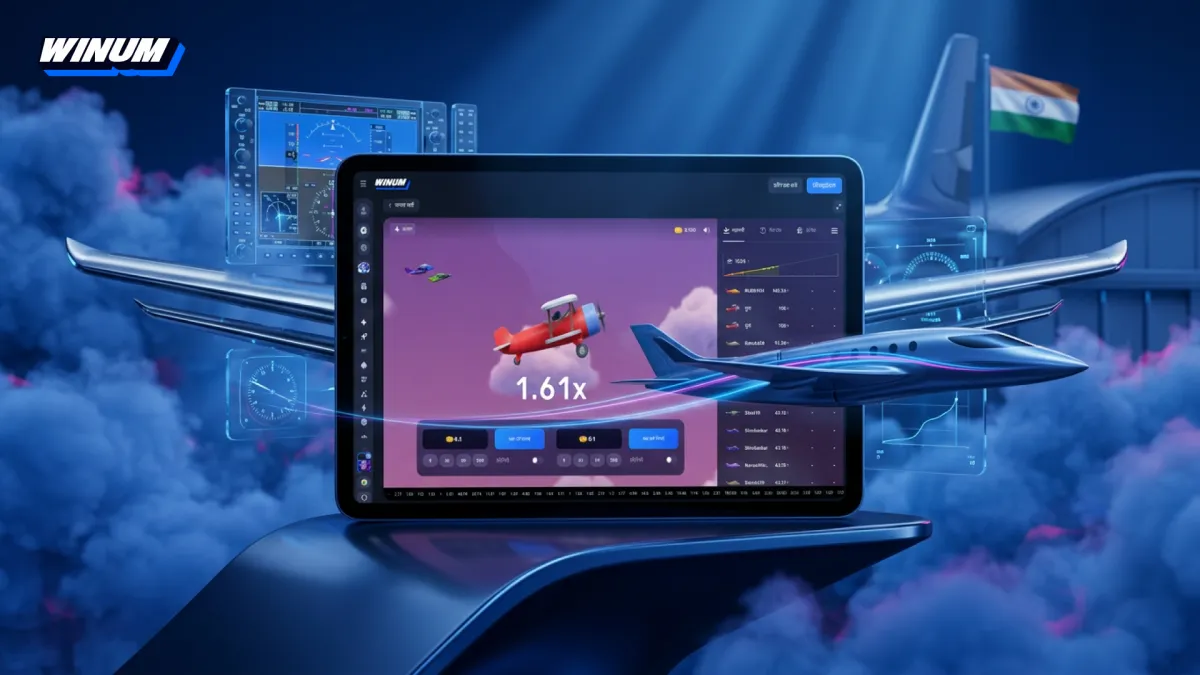
The game screen keeps everything within reach. The flight takes the centre, two bet panels sit below it, and a strip of recent multipliers runs along the bottom.
Manual Betting with Colour CuesA manual round follows four actions, and each button changes colour to show its state.
- Enter the stake on one or both panels, or tap a preset of 5, 25, 50 or 200.
- Press PLACE BET before the round begins, and the button turns active.
- Watch the plane climb while the multiplier increases.
- Press Cash Out at the chosen moment, and the button turns green and shows the current payout.
If the plane crashes before Cash Out, the stake is lost.
Two Independent BetsAviatrix gives players two bet panels in every round. Each has its own stake and its own Cash Out button, so one bet can win while the other loses in the same flight.
The standard use is a hedge. The first bet aims for a modest x1.5-x2 to protect the bankroll, and the second targets x5-x10 for a bigger return. Both panels together turn a single round into a balanced plan.
Automation and Stop ConditionsThe Auto play switch on each panel places the same bet every round for a chosen number of rounds. The Auto Cash Out field next to the stake takes a target multiplier, for example x2.00, and closes the bet automatically when it is reached.
Advanced Auto play settings add three stop conditions.
- Stop when the total win over several rounds exceeds a set amount
- Stop when the total loss over several rounds exceeds a set amount
- Stop when the win from a single bet exceeds a set amount
These conditions turn personal limits into automatic rules. The game stops itself to lock in a big result or protect the bankroll, with no need to watch every round.
Game Interface and Settings at Winum
Aviatrix puts statistics, settings and social elements on one screen. The right side of the interface carries three tabs and a settings menu. Here is how each part helps during play.
Participants, My Bets and Promos TabsThe Participants tab lists every player in the current round with their plane, bet amount, Cash Out multiplier and win, plus a counter of total participants. My bets keeps the history of the player's own bets and withdrawals. The Promos tab shows in-game offers.
Above the participants list, a green line charts the multiplier as it grows. At the bottom of the screen, a horizontal strip shows recent results such as 4.1, 1.23, 1.3, 2.44, 3.55, 1.32 and 6.88, which gives a quick feel for the current run of rounds.
Sound, Graphics and Lite ModeThe gear icon opens the game settings. Five options control sound, graphics load and fairness checks.
| Setting | Function |
|---|---|
| Music | Turns background music on or off |
| Game Sounds | Turns take-off, crash and win sounds on or off |
| UI Sounds | Turns clicks and notification sounds on or off |
| Lite mode | Reduces the graphics load for slower devices |
| Provably Fair | Opens the fairness check |
Lite mode is the setting to remember on older phones, since it keeps the game smooth during long sessions. The music option also lets players pick a calmer background track.
What Happens If the Connection DropsAviatrix covers three technical situations. If the connection breaks during a flight with an active bet, the system cashes out automatically at the current multiplier as long as the round has not ended.
If the disconnection happens while bets are being placed, the stakes return to the balance. In the case of a hardware or software malfunction, all affected bets are refunded and wins are voided, so a technical problem never costs the player the stake.
Try Aviatrix at Winum →Plane Customisation and Skins in the Winum Version
The feature that defines Aviatrix is the personal plane. It appears in the player's profile and is visible to other players during the flight.
Building a Plane with the Build MenuThe Build button in the top left corner opens the hangar. On first entry, the player assembles a plane in two steps.
Body Color offers 12 options: red, orange, brown, purple, blue, light blue, turquoise, green, lime, white, grey and dark grey. Details offers 3 colour schemes for the trim. A tap on Next completes the build, and the plane takes to the sky in the next round.
Skins and Rarity LevelsBeyond the basic build, Aviatrix offers a collection of skins in three rarity levels: Legendary, the rarest designs, Epic, distinctive special editions, and Standard, the base skin available to everyone.
Skins are grouped into collections. The Winum version shows, for example, the Ember Fall collection with the Legendary skin Leafshroud. Each skin can be viewed in 3D with the 360° icon, and switching between owned skins takes place in the My Skins section.
XP, Levels and Leaderboard at Winum
Aviatrix adds long-term goals to fast rounds. Every bet builds progress, and the results are visible in the profile and on public rankings.
How XP Is EarnedA customised plane earns experience points for placed bets at a rate of 1 XP for every €1 wagered. Bets in other currencies are converted at the current rate. For example, ten bets of €0.10 give 1 XP.
Each new level unlocks an extra visual feature for the plane. Levels and customisation have no effect on bets, odds or multipliers, so every player faces exactly the same maths regardless of progress.
Profile and AchievementsThe profile shows the current level and four statistics: Max odds, Avg. odds, Max win and Rewards. The skin collection is displayed there as well, with space for new additions.
Achievements appear as collectible badges. The known ones are Big Win, Super Win, Epic Win and Lucky, and more hidden achievements open up during play. They reward milestones rather than change the game.
Leaderboard RankingsThe leaderboard lets players compare progress with the whole community. It has two tabs, Leaders for XP and level and Winnings for wins, and four periods: Day, Week, Month and All time.
Each row shows the position, the player's plane, name, XP and level. The daily period gives new players a realistic chance to appear on the board quickly.
Provably Fair System on Winum
Aviatrix uses a two-part fairness system that any player can check. The client part, Your next seed, works in Random mode, where a seed is generated automatically for each game, or in Custom mode, where the player enters a personal seed.
The server part, Server's next hash, is published in encrypted form before the round begins. The round result comes from the combination of the client seed and the server hash. After a round, any bet from the history can be selected and verified by comparing the hash with the result.
Winum rules ban bots, scripts and any software for gaining an unfair advantage. Violations can lead to account closure and cancelled winnings, which keeps the playing field equal for everyone.
Aviatrix Strategies at Winum
Strategies manage risk, stake size and session length, while the outcome of each round stays independent. Aviatrix adds one more dimension: XP progress. Eight approaches cover most playing styles.
Low Risk at x1.2 to x1.5Set Auto Cash Out at x1.2 or x1.5, use a fixed stake of around 2% of the bankroll and switch on Auto play. Long sessions at low targets produce frequent small wins.
The bonus in Aviatrix is progress: even careful play keeps adding XP and moves the plane up the levels.
Hedged Double BetPlace USD 5 with Auto Cash Out at x1.5 on the first panel and USD 1 with Auto Cash Out at x5 on the second. The total stake is USD 6.
If both win, the return is USD 12.50 and the profit USD 6.50. If only the first wins, the return is USD 7.50 and the profit USD 1.50. If neither wins, the loss is USD 6.
Automation with LimitsSwitch on Auto play, set Auto Cash Out at x2.0 and add two stop conditions: a total loss above USD 20 and a total win above USD 30. Then start the automatic run.
The game stops on its own as soon as either limit is hit, which removes emotional decisions from the session.
XP FarmingThis approach suits players who want levels and cosmetic rewards. Use the minimum stake of USD 0.10, a low Auto Cash Out of x1.1-x1.2 and Auto play for the maximum number of rounds.
At about 100 rounds per hour, the turnover reaches roughly USD 10 per hour, and XP is credited on that turnover at 1 XP per €1. Risk stays low while the plane keeps progressing.
High Multiplier HuntThis is the high-risk option. Use the minimum stake, leave Auto Cash Out off or set it very high at x50-x100, and cash out manually while watching the multiplier chart. Expect long losing runs.
The ceiling is x10,000. At a USD 0.10 stake, that caps the payout at USD 1,000, while the full USD 10,000 limit becomes reachable from a USD 1 stake.
MartingaleStart at USD 0.10 with a target of x2, double the stake after every loss and return to the starting stake after a win.
Limit the sequence to 7-8 doublings. Eight doublings from USD 0.10 lead to USD 25.60, well within the USD 200 maximum bet. When the limit is reached, end the session.
Reading the Multiplier HistoryThe strip at the bottom and the multiplier chart on the right show how recent rounds went. Some players switch to bolder targets after a run of results below x1.5 and return to cautious targets after an extreme result above x10.
The history does not predict the next round, since each round is independent. It works as a pacing tool that helps decide when to change targets without acting on impulse.
Automatic Session LimitsSet a win limit of +50% of the bankroll and a loss limit of -30% through the Auto play stop conditions. The game halts automatically when either is reached. Lite mode helps keep long sessions smooth.
Levels, skins and achievements make Aviatrix easy to keep playing. Automatic limits keep the session under control while the plane keeps growing.
Aviatrix Demo Versus Real Money on Winum
Aviatrix has a demo mode at Winum with a virtual balance of DM 3,000. The demo shows the full game: two panels with presets of 5, 25, 50 and 200, Auto play, the Build menu, skins and the settings.
Demo play is ideal for testing stop conditions, trying the hedged double bet and getting used to the 5-second betting window. Only real money brings actual winnings, and demo bets do not count toward wagering, cashback or Winum Points.
New Player Free Spins at Winum
New players from India receive a package of 600 free spins over the first four deposits. The bonus is credited automatically, with no promo code needed. Each deposit brings a larger batch of spins.
| Deposit | Free spins |
|---|---|
| 1st | 130 FS |
| 2nd | 140 FS |
| 3rd | 160 FS |
| 4th | 170 FS |
| Total | 600 FS |
Each step is credited once, right after its deposit. The first deposit bonus card for an INR account carries these terms.
| First deposit bonus | Value |
|---|---|
| Bonus | +130 Free Spins |
| Minimum deposit | ₹300 |
| Maximum win | ₹2,500 |
| Maximum withdrawal | ₹2,038.35 |
| Currency | INR |
| Wager | x20 |
The first deposit bonus card lists 11 games for the free spins: 3 Super Hot Chillies, Coin Up Hot Fire, Coin Volcano and Power Sun by 3 Oaks Gaming, 5 Wild Wild Peppers and Mummyland Treasures by Belatra, Bonanza Billion, Hot Chilli Bells, Snoop Dogg Dollars and Wild Tiger by BGaming, and Aviator by Spribe.
A deposit of INR 300 is enough to open each step of the package.
While wagering, a single bet must stay within INR 450. Only one casino bonus can be active at a time, and a withdrawal request with an active bonus cancels it. Casino bonuses are wagered only in the Bonus Wagering category, whose game list changes, so it should be checked before each session.
Claim 600 Free Spins at Winum →Rupee Deposits and Withdrawals on Winum
All fiat deposits for Indian players are credited instantly. Deposits run through five fiat methods and crypto, starting from INR 300.
| Method | Deposit limits | Processing |
|---|---|---|
| UPI | INR 500 to INR 50,000 | Instant |
| PayTM | INR 300 to INR 50,000 | Instant |
| Paytm pay in app | INR 300 to INR 10,000 | Instant |
| PhonePe | INR 300 to INR 50,000 | Instant |
| PhonePe (2nd method) | INR 500 to INR 50,000 | Instant |
| Cryptocurrencies | Depend on the coin | Up to 5-10 minutes |
PayTM, Paytm pay in app and PhonePe start from INR 300, the lowest entry point for a first Aviatrix session. Winum also accepts eight cryptocurrencies: USDT, ETH, TON, USDC, BNB, BTC, TRX and LTC, with crypto withdrawals processed within up to 1 hour.
Withdrawals in India require identity verification, and the minimum withdrawal is INR 1,500. The current list of withdrawal methods is available on the official Winum site. Verification starts in three cases: the first withdrawal request, total deposits above USD 10,000 or its equivalent, and unusual activity. Documents must be sent within 30 days, so completing KYC early keeps the first payout smooth.
Deposit and Play Aviatrix →Winum Verdict on Aviatrix
Aviatrix at Winum combines crash-game tension with a full progression system built around a custom plane, XP, levels and a leaderboard. RTP 97%, a x10,000 ceiling, bets from USD 0.10 to USD 200, two panels and Auto play with three stop conditions give full control over every session.
The custom plane, skins, XP and leaderboard add goals beyond the next Cash Out, without touching the odds. Demo mode, INR deposits from ₹300 and a 600 free spins welcome package make the start easy. The one step to plan ahead is KYC, which is required for withdrawals in India.
FAQ
Is Aviatrix available in India at Winum?Yes. Aviatrix is part of the Winum catalogue and appears in the Quick games row of the lobby. Indian players can play it in demo mode or for real money after registration, funding the account with UPI, PayTM, PhonePe or cryptocurrency.
What are the minimum and maximum bets in Aviatrix?Bets range from USD 0.10 to USD 200, and the maximum payout is USD 10,000 per bet. The multiplier can reach x10,000.
Can Aviatrix be played for free?Yes. The demo mode at Winum gives a virtual balance of DM 3,000 and keeps all features, including two bets, Auto play, the Build menu and skins. Demo bets bring no real winnings and do not count toward wagering, cashback or Winum Points.
Do skins and levels affect winnings?No. Skins, colours and levels are purely cosmetic. XP is earned at 1 XP per €1 wagered and unlocks visual features for the plane, while odds and multipliers remain identical for every player.
Is Aviatrix a slot?Many players search for "Aviatrix slot", but Aviatrix is a crash game, not a slot. There are no reels or paylines: the player bets, watches the multiplier climb and cashes out before the plane crashes.
Start Playing Aviatrix at Winum →